Introduction#
So recently i’ve got Stylophone Beat as present. In short it is very simple Drum machine. It can play one-shot audio samples, usually from drum section(kick, clap, snare, hat) and bass lines. Also it have simple sequencer which can record your touches and play elements with same timings as recorded to record on top other elements and make your song more complex and interesting. The special thing about this device that all music elements can be played with specific stylus attached on wire.
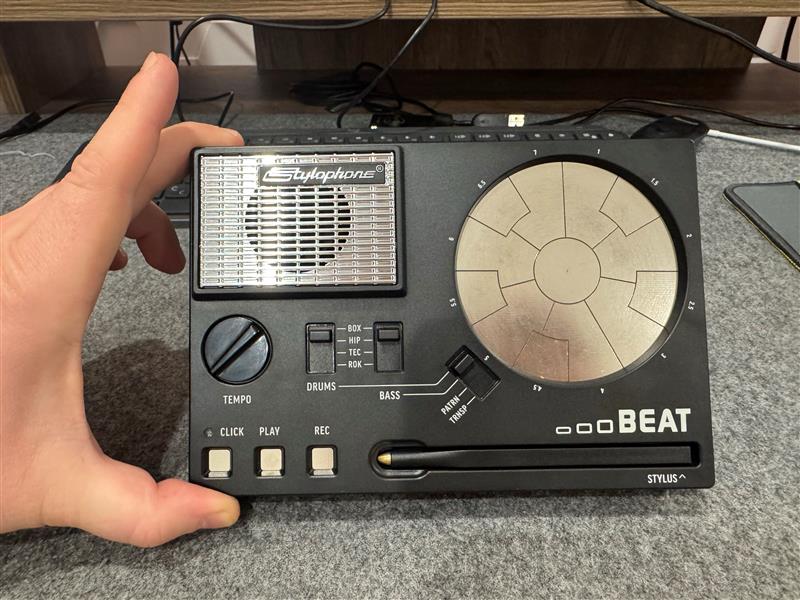
Small note: There is probably can be some public articles regarding modifying this device, but i decided to not google anything about that and figure out on my own.
The idea#
After playing some time with this device i’ve decided to look inside and maybe modify it somehow to make it more interesting. The stock sample sounds sounds not so interesting after while also some of them sounds dirty or with some sort overdrive. After opening device we can see here small I/O and power distribution PCB which is not interesting right now. The second big one PCB looks like main, have switches, pads and stylus and more interesting some group of electronic components in left bottom corner.
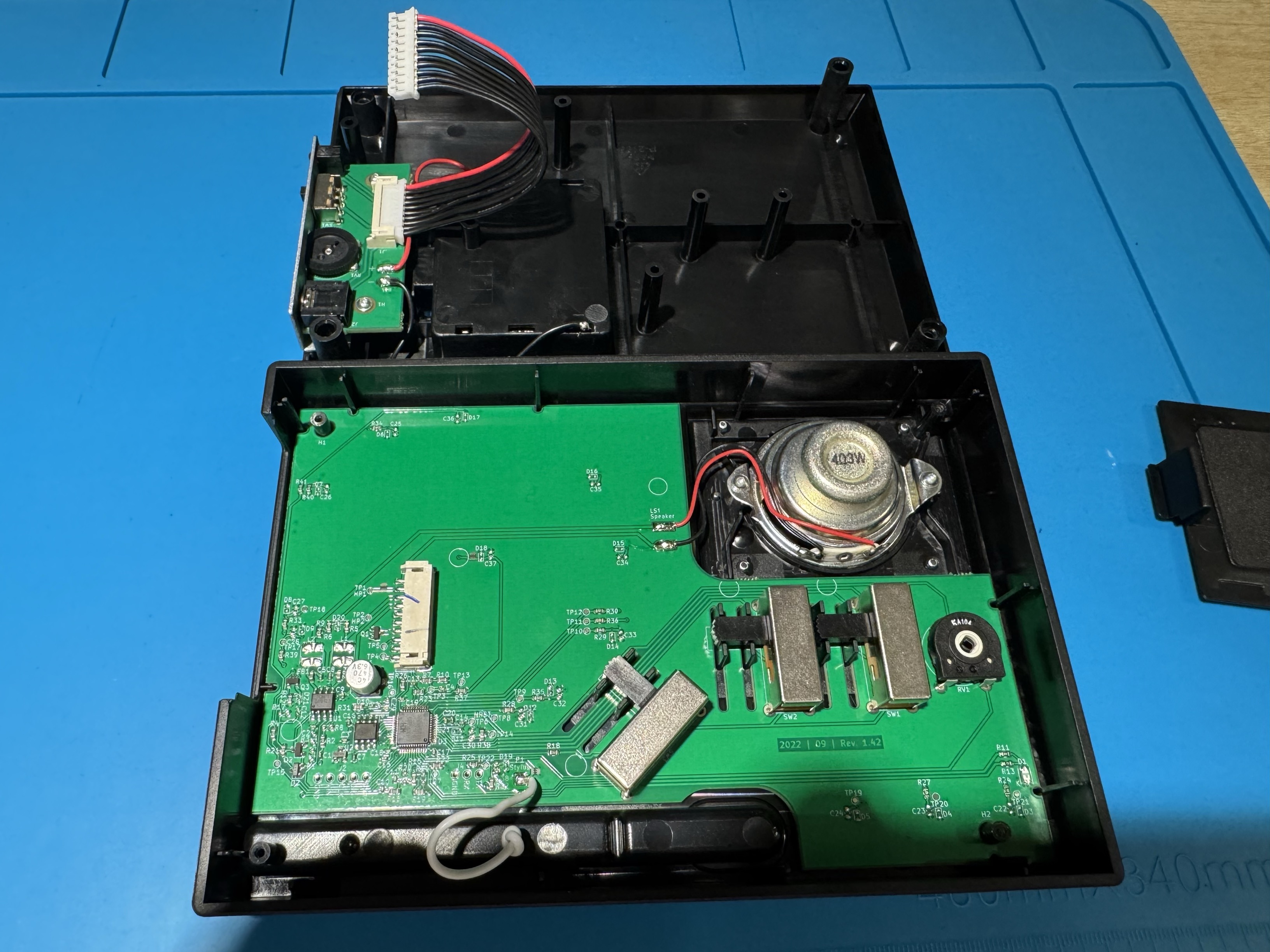
Let’s look closely what we have here.
- The blue one is
TC8871- Single channel 5W class D audio amplifier. Datasheet - The yellow one
XT25F16B- SPI NOR Flash memory chip. Datasheet - The red one
WCH CH32F203- Chinese clone of “STM32 F203”. Their clone datasheets can be found here: Datasheet. But as i know these clones should be pin-to-pin compatible with original STM32 products and firmware also should be same for both.
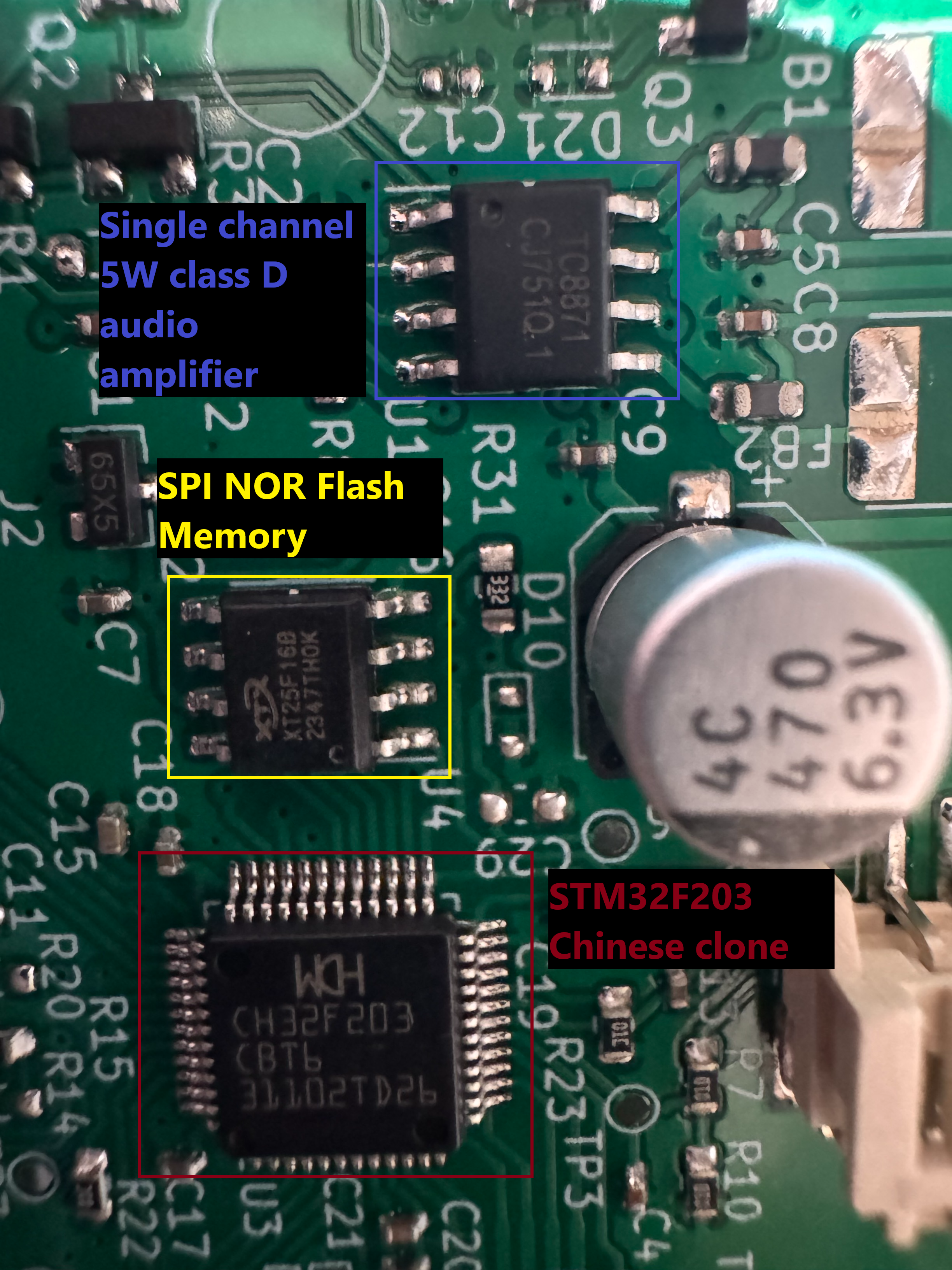
Based on that information i can say that audio amplifier is less interesting target for us. STM32 MCU anyway will have some bootloader or basic firmware and i think it can be easily dumped for reverse engineering. But reverse engineering of firmware can take a lot of time and not sure what we can achieve from it right now. The most interesting target for me right now is SPI flash, i have assumption that it can have 50/50 firmware or actual audio samples which is played by device while touching keys. So let’s dump it and check what we have.
Dumping#
To be able dump this SPI memory i’ve used CH341A dumper device. It is device designed to easily read and write memory chips like this, of SPI(25XX) and I2C(24XX) families of them. There is also a bunch of clips and proxy/socket boards exists for different chip packages and pinouts which you can use for communication with your specific model. As well as there is several software solutions which can work with CH341A dumper, in my case i was using NeoProgrammer but don’t forget to install their drivers before using software, otherwise it cannot find dumper.
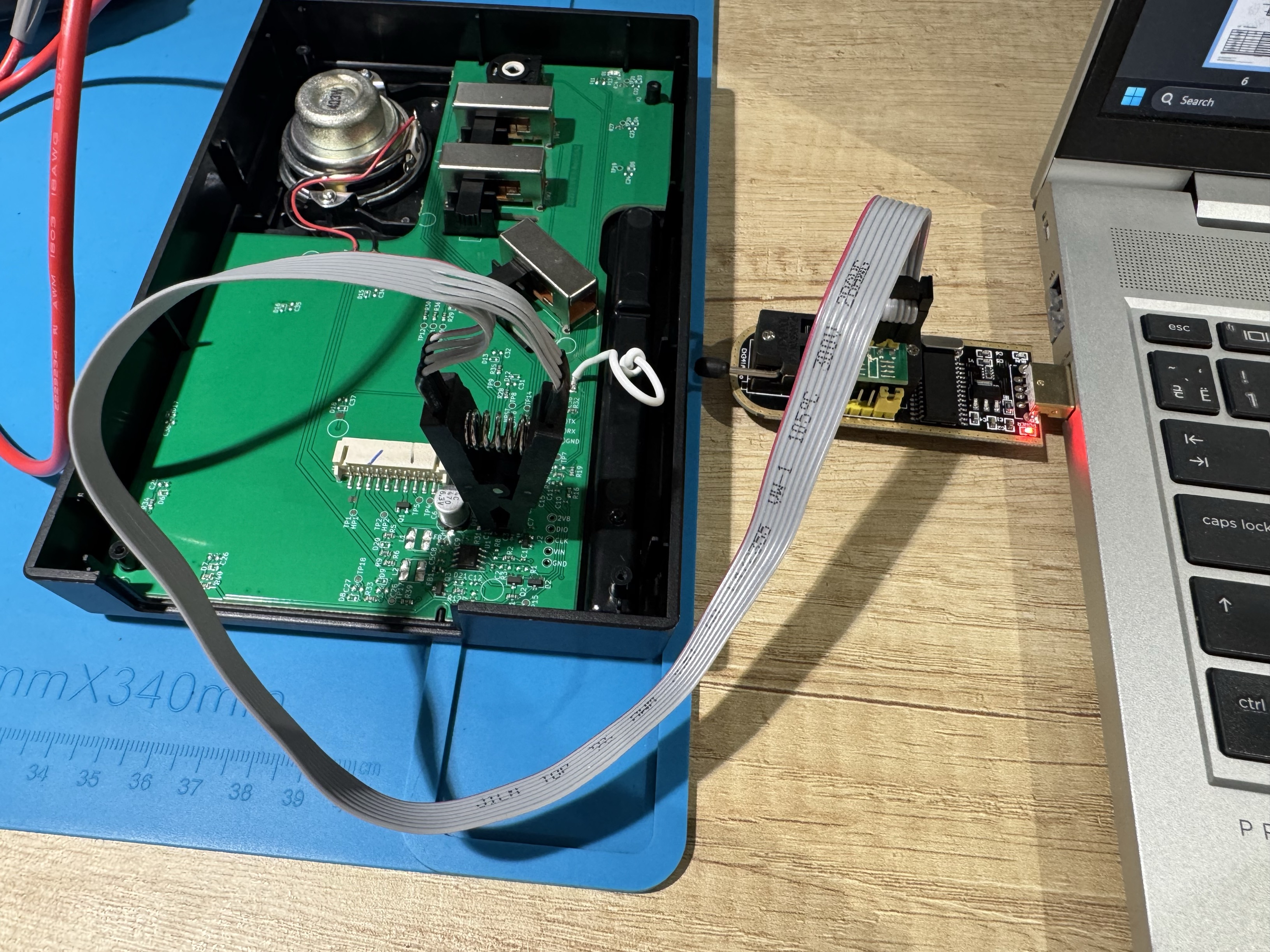
Well, I attached the clip to SPI memory, selected my specific chip XT25F16B and started trying to read device, but i got “no response from chip”. In program log window there is also small message that my dumper probably need hardware patch to be able to work with XT25XXX devices. Okay i opened instruction and it says that i need to resolder one of CH341A MCU pins directly to 3.3 voltage regulator.
And with this patch it looks like this. You also can see that SPI flash here already de-soldered from original PCB, it was because after CH341A patching, NeoProgrammer continue to say that it cannot communicate with the chip.
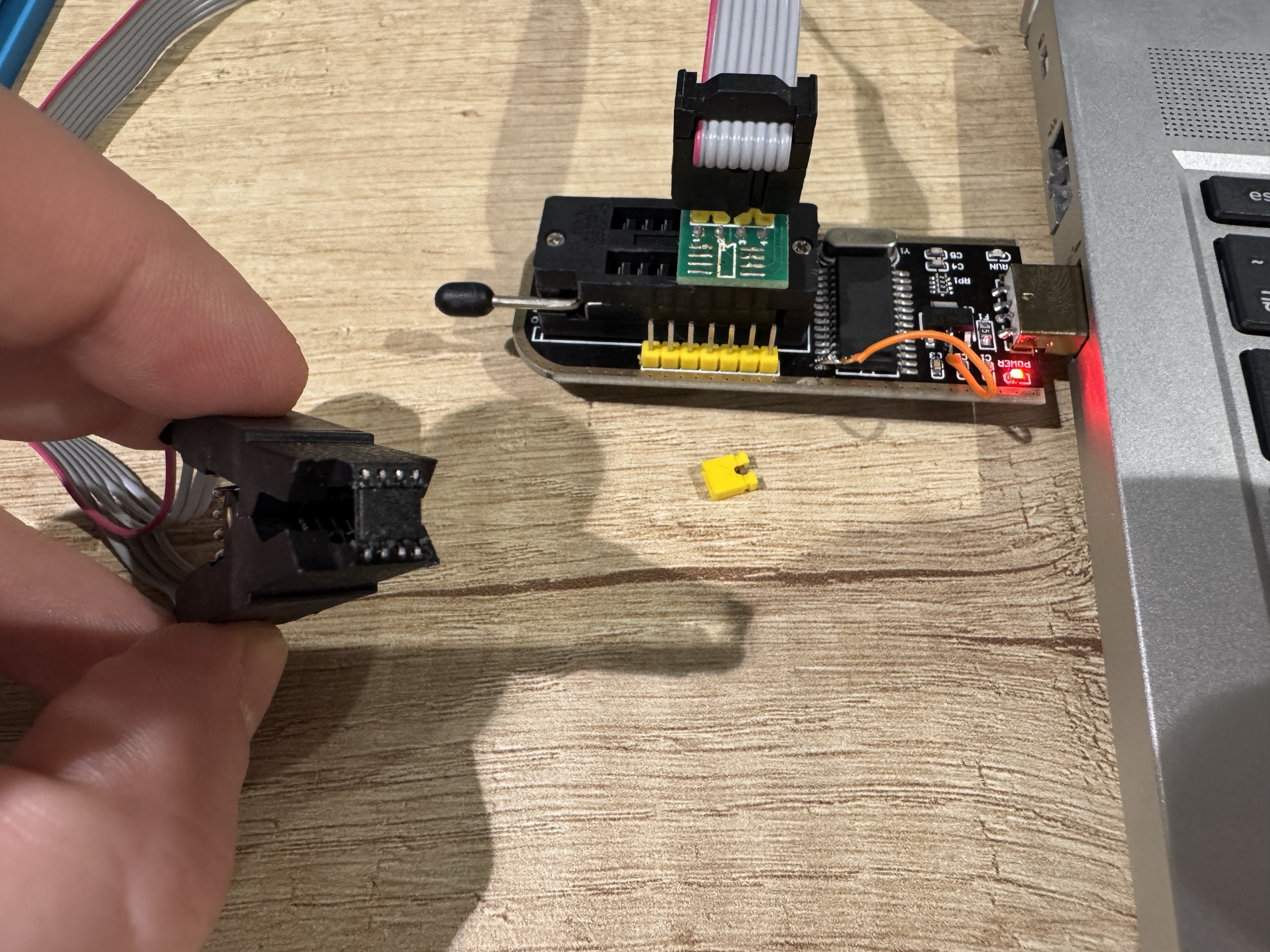
I was thinking it can be fair, cause maybe by powering this SPI chip on PCB for dumping, i also power whole PCB and it can drain more current than limit of USB which is around 200-500mA. Interestingly, even de-soldered chip was not detected. But after opening a bit clip and pushing SPI more in to clip it became alive. Looks like clip have quite short pins and cannot reach SPI.
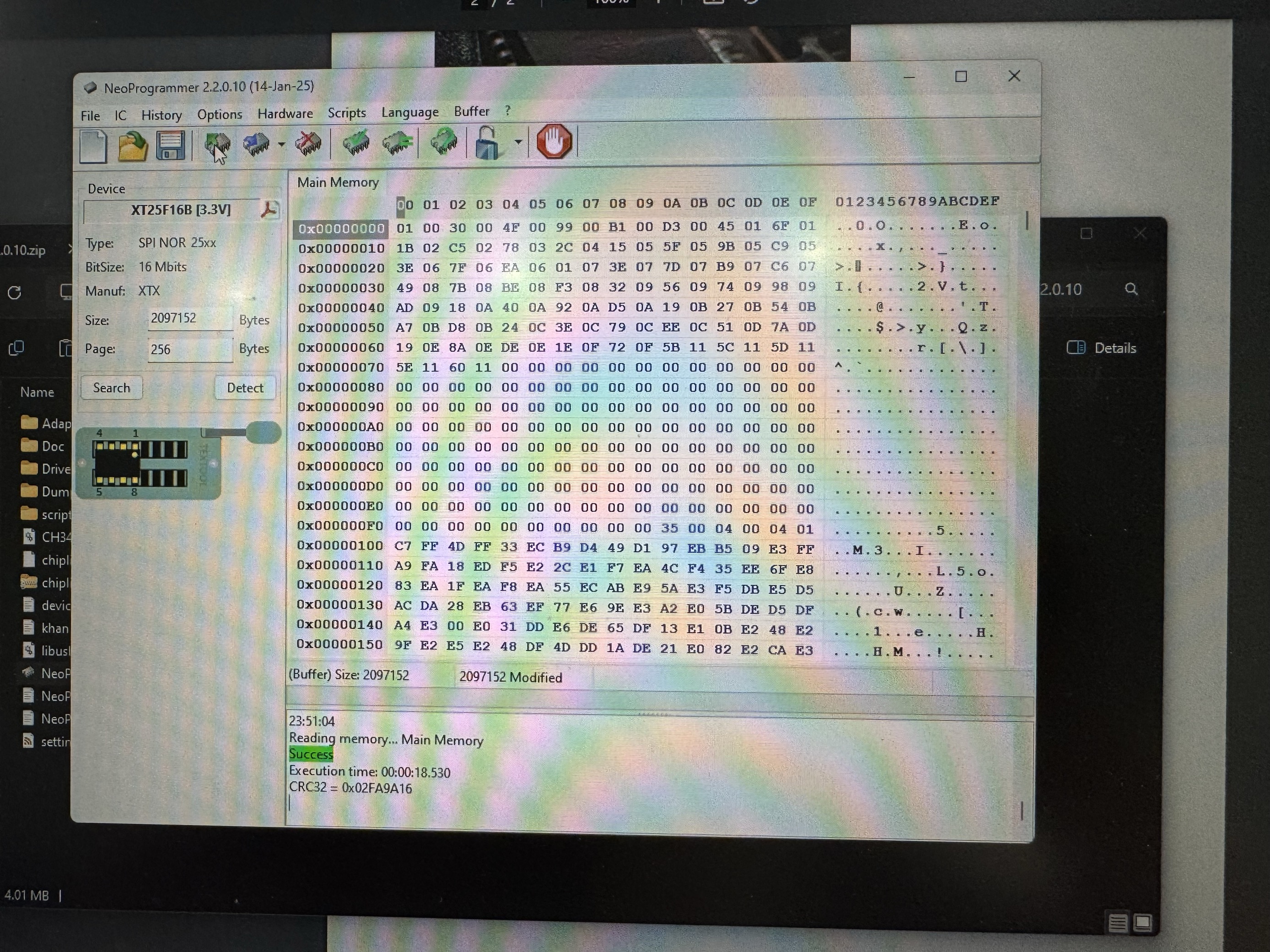
And here we can see that we finally dumped our SPI flash. The resulting binary what i got is 2048KB.
Reverse engineering#
We have some binary blob which i assume 50/50 can be part of firmware or actual samples stored in some format.
So let’s apply here some reverse engineering techniques for undocumented data structure. First of all remember that any binary should have some kind of structure. It can be some project files from application, network packets and blobs like this, and during time you can train your eyes to split data in to some chunks or sub-structures. Of course there is can be cases when data is stored in encrypted format, in such cases there is impossible to detect some patterns of data or structures. I like to do binary research from wide to narrow, by checking and cutting big assumptions.
Let’s start here from checking is it encrypted data or not. We can check that by calculating entropy of binary data. Here i use CyberChef web tool which allows very fast perform some checks and chained data processing.
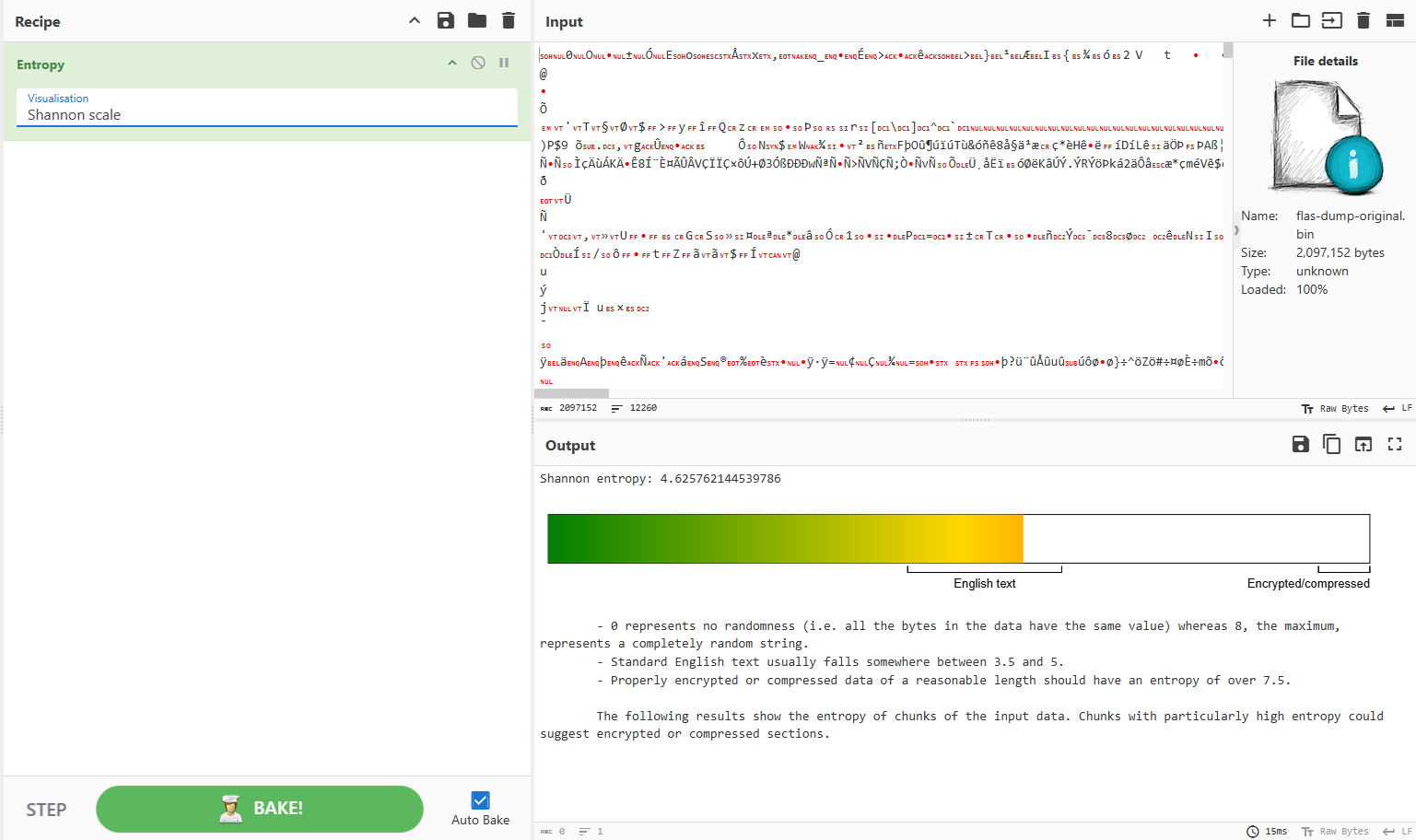
We can see that on Shannon scale entropy value is below 7 and it looks like not encrypted data. Also we can chose different visualization of data, instead of Shannon scale i chose image and got this:
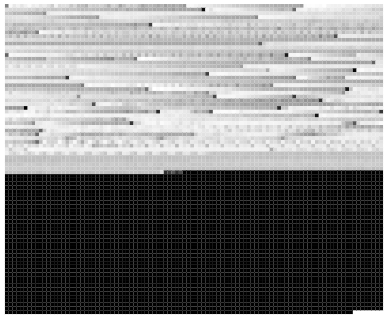
Here each pixel represents one or several bytes of data from file. Color here only in range between black and white which is normalized to byte value 0-255. In overall i think it doesn’t looks like firmware structure.
For example here is how firmware file from other project looks like:
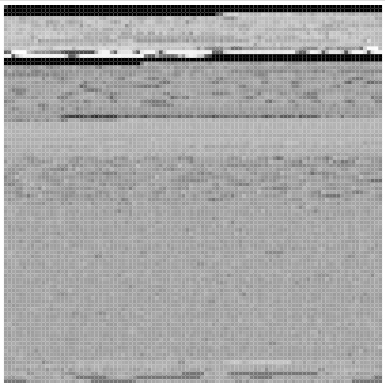
We can see here repetitive patterns or chunks of data in firmware file.
In dumped binary file we can see some sort of lines with increased intensity to the end of each.
The Detect file type also gives no info. It will be strange if there will be some known file format. Because it will be waste of MCU resources, memory and CPU cycles to handle variety of file formats and types of something.
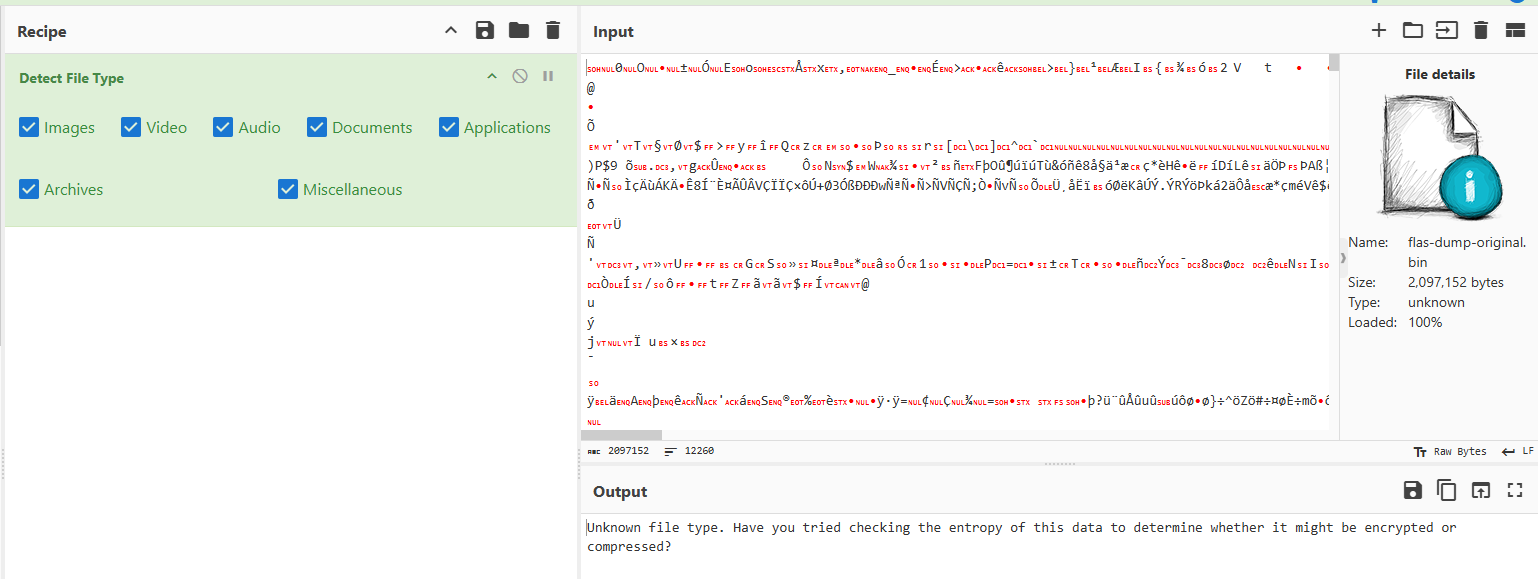
Okay let’s open it in Hex editor and browse little bit.
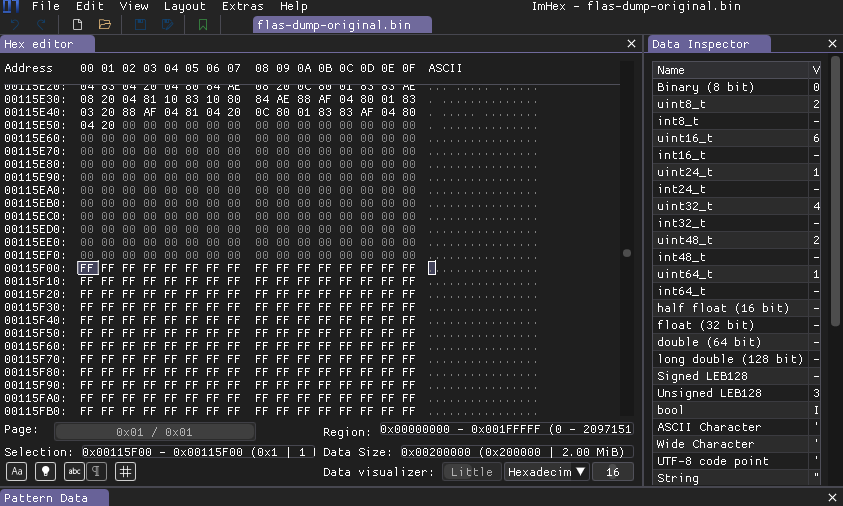
The file size is 0x00200000 and starting from address 0x00115F00 and to the end of file there is just 0xFF bytes, so not all flash memory is used in our case. Usually developers fill unused area with 0xFF bytes. To not distract on those 0xFF bytes i just stripped file and removed these 0xFF.
After some browsing of the file i saw that there is some zeroed areas between some blocks of data. So it looks like split between some chunks.
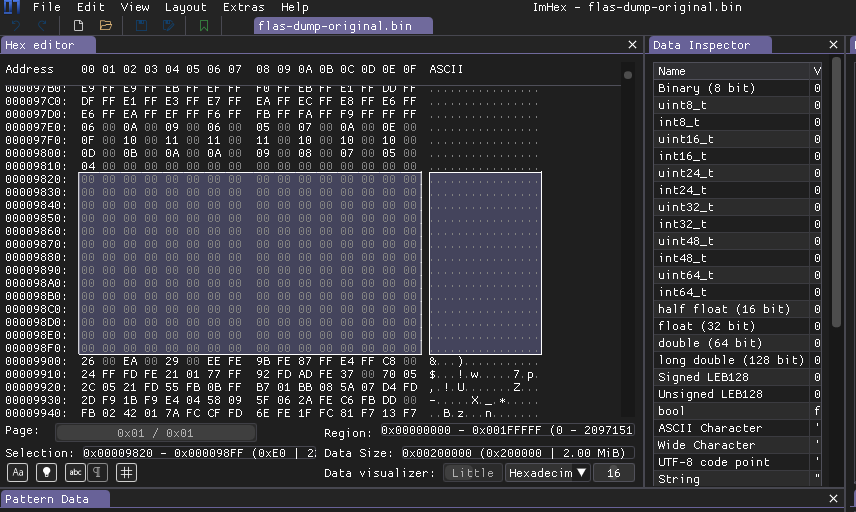
I decided to start bookmarking addresses right after zeroed chunk end. By doing that i can see how much bytes each chunk takes and later i can try to find these values of chunk sizes.
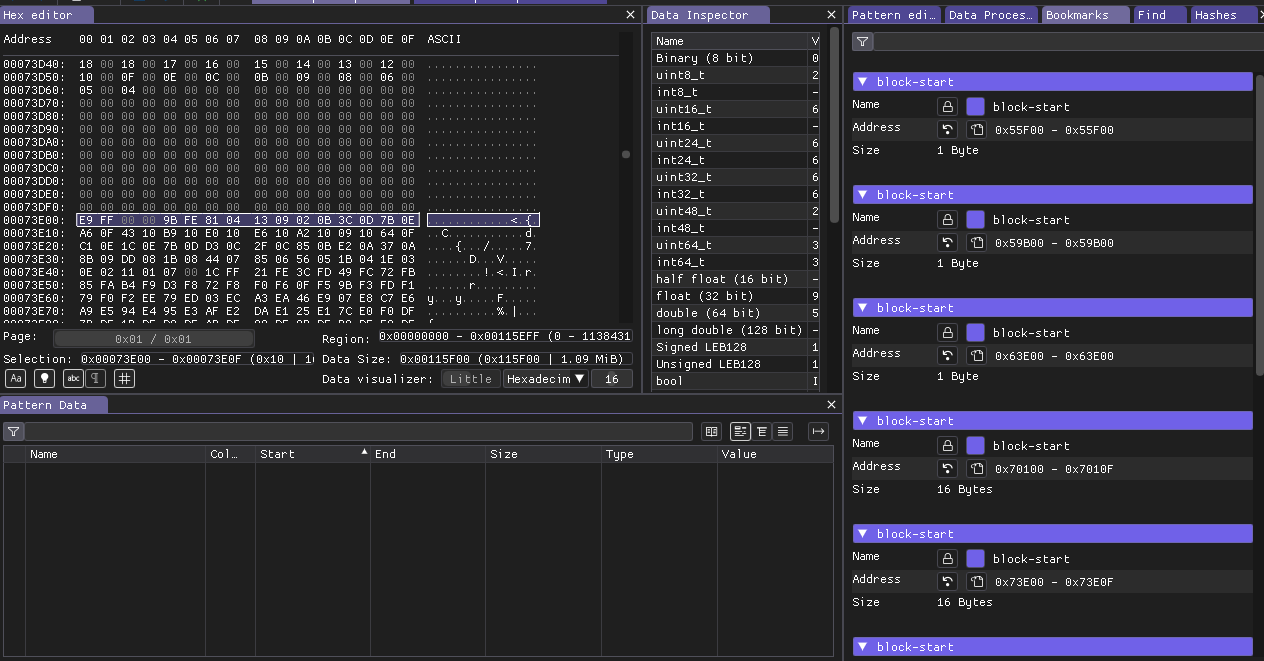
Here you can see some bookmarks is 1 byte and some of them 16 bytes you can ignore that, most interesting it is start addresses of bookmarks, by calculating them we can see that chunks have different size, this is probably what we saw on the entropy image. Also i was assuming that after zero chunks we always have some header which should contain chunk size, but turns out no, there is not possible to determine some repetitive structure for these chunks.
Okay let’s scroll to the top of the file and try to figure out what we have in general. I assume that we have some audio samples in unknown format. Also i think all samples should have same size.
Based on this at top of the file we should have some general header.
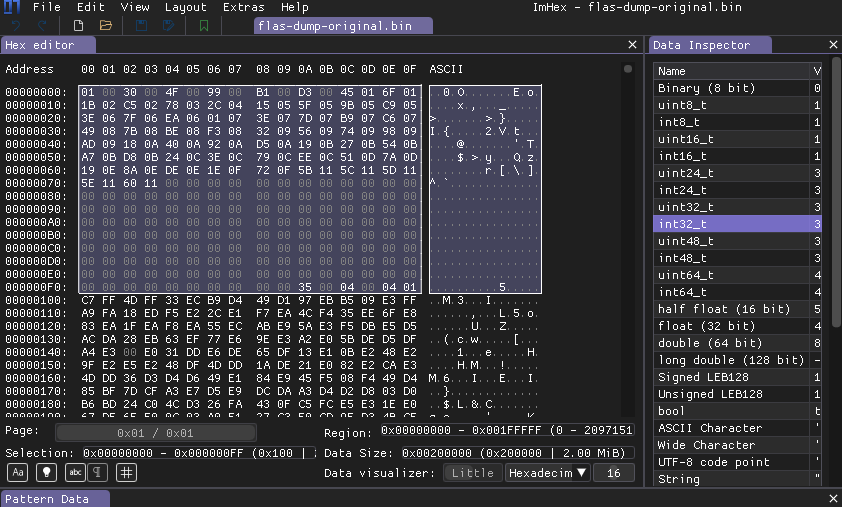
We can see that this header takes exactly 0x100 bytes, after it we can see start of first chunk. So if it contains audio samples then we probably should have all of them here. Let’s do some math.
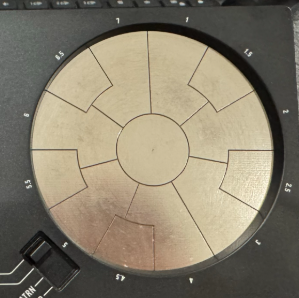
Here we can see 12 metal pads which corresponds to each sound, except middle pad which is for muting or deleting recorded notes.
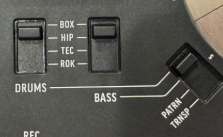
Also we have 4 drum banks of different one-shot samples. So in total there should be 4 * 12 = 48 samples. The 4 banks of bass i think is generated by STM32 MCU so we don’t count them.
After some time i came up with this kind of header structure. You can see colored blocks of bytes, which is split and colored by structure which you can see on right side of screenshot. At the bottom side there is interpretation of these bytes in to corresponding data types.
In my vision of this i was thinking about expandability or future re-usage of manufacturer some structures or algorithms. So in good design it is good to have some version or size of chunk or follow some TLV approach.
Size here is 0x01 but i assume here value can be Big-Endian size or Little-Endian version of this structure.
The second value 0x30(48) is a complete match of sample count which i assumed earlier.
So the next values looks like 16bit size/address/offset. They start from zero and little bit increase during time.
Next we have some unknown values which probably not interesting right now.
Next we can see some space of 0x00, probably reserved area for other future data.
And at the end we have some additional flags or CRC checksum.
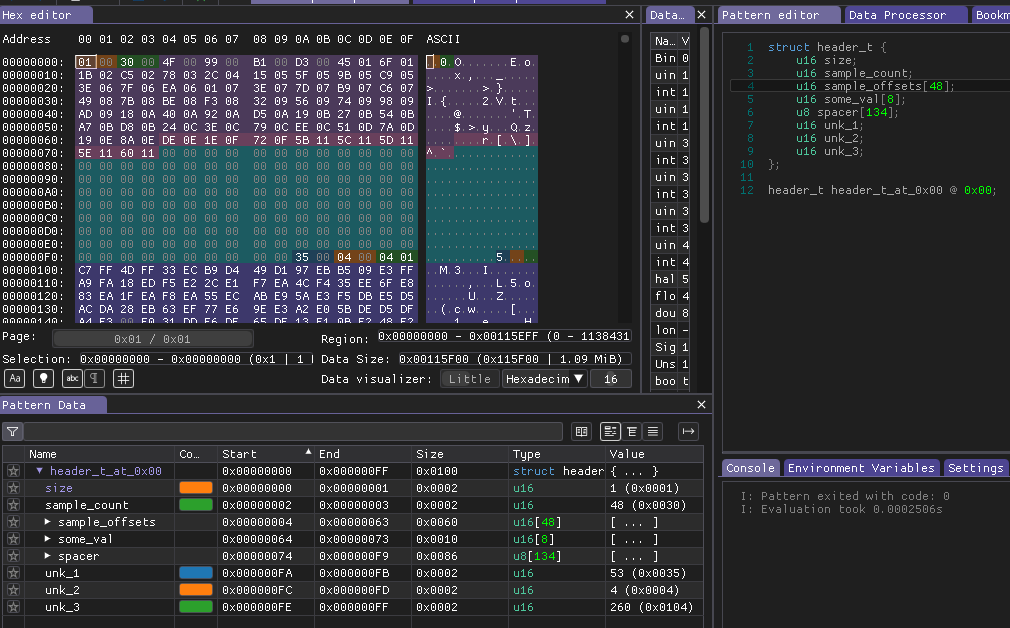
I was assuming manufacturer spend a lot of time in software, planning expandability and other stuff and i was completely wrong. None of 48 offsets in array is matching start of previously marked chunks of data. I was generating new ideas that they probably can have some bit shift in offsets, or constant offset, or even they count not bytes, but maybe offset should be multiplied by 2, 4, 8 to reveal actual size of chunk and it’s start, but all of these assumptions doesn’t work.
Okay at this moment I’m pretty confident that we should find here some samples. I decided to start from describing header from scratch. But first of all i want to mark around 5 first chunks of data which starts after zero block and just write down their offsets. Also i just want describe this 0x100 header area as u16 values.
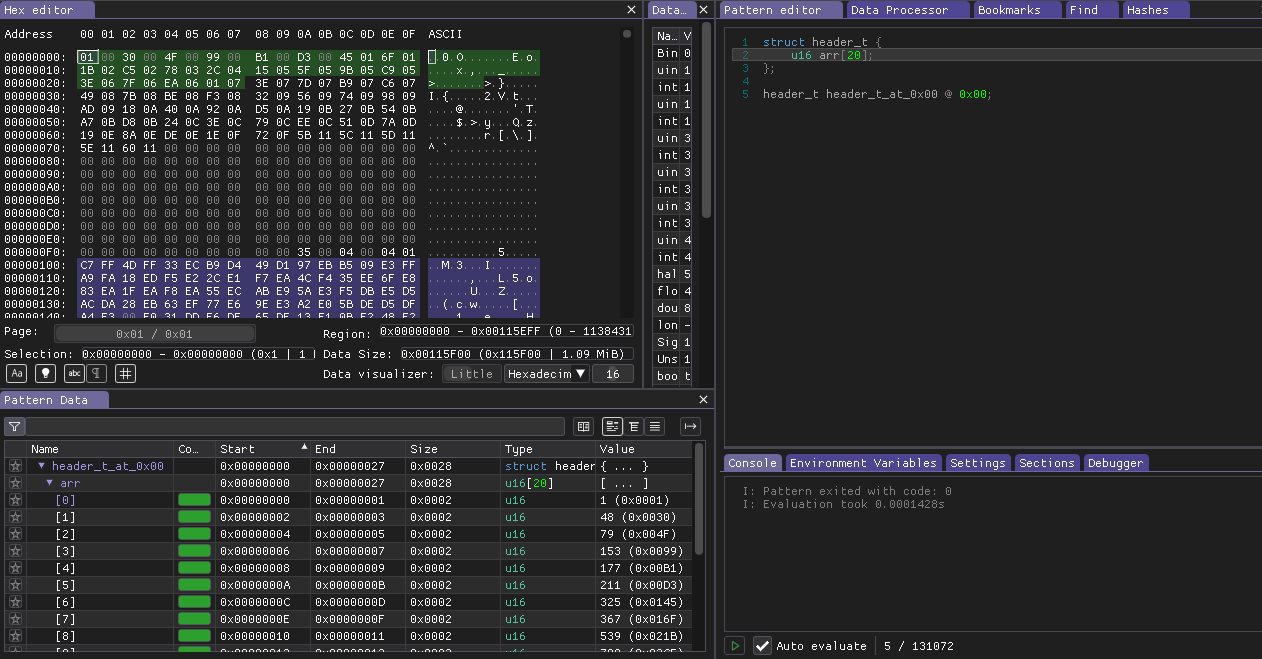
And now header looks like this.
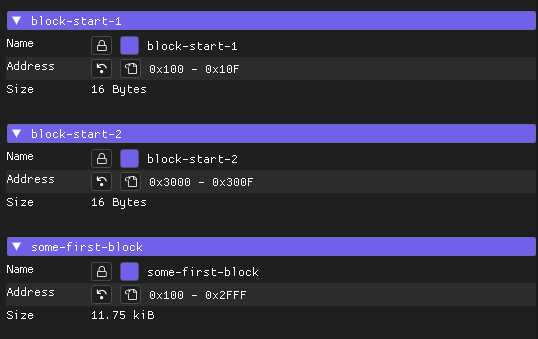
And here is bookmarked addresses of first chunks 0x100, 0x3000.
Finally it looks like what we have. So if we just change our structure representation to Big-Endian globally we can see exact offsets of these data chunks.
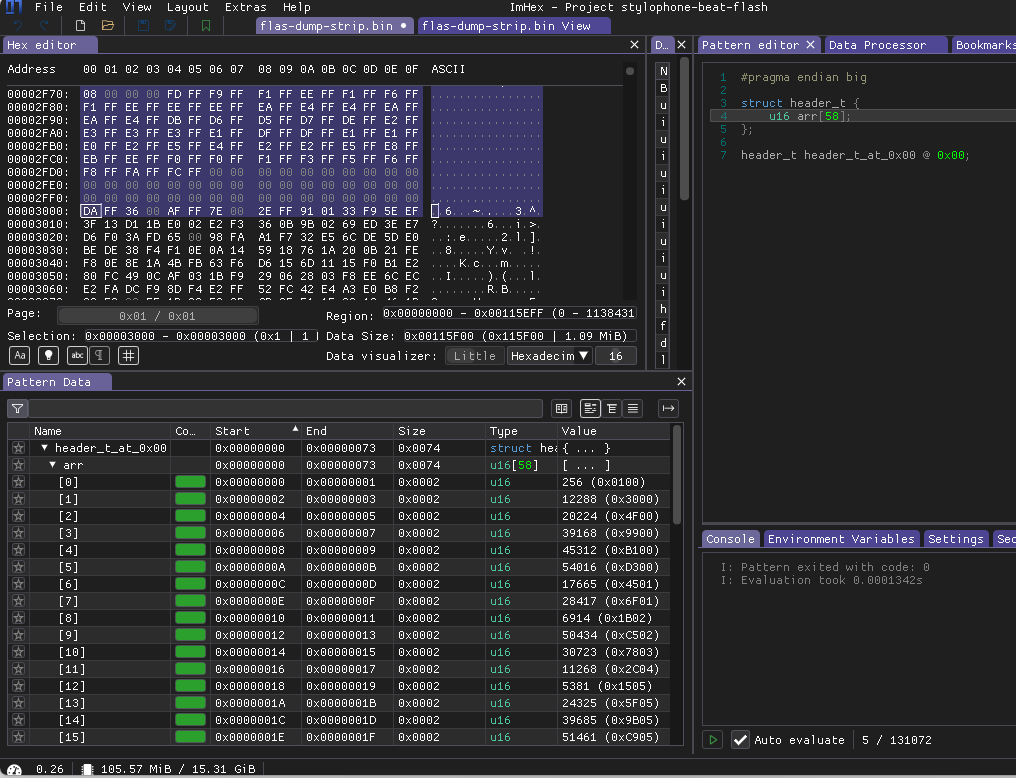
Like here 0x3000 offset start of chunk. So i decided to take that first chunk on addresses 0x100 - 0x3000 and check what we can have here if there is no structure.
To check that it is good to use Audacity it is free simple DAW but it have some low level features which helps us. We should go in to File → Import → Raw Data
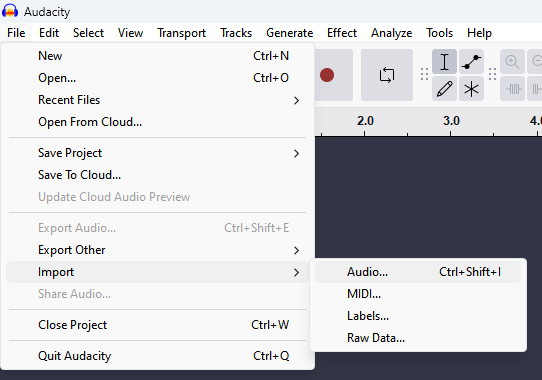
A little bit context about audio files. Usually they stored in some container which can be decoded and played by audio players, it can be WAV, MP3, or any other container. Container here stores information about audio channels count(1-Mono, 2-Stereo, or 5.1-Dolby), sample rate and bit rate. The Raw Data menu field allows us to just load byte stream, without container or header and then chose how to interpret it. So after selecting my file with data i tried to load it with this configuration. Single channel because from device photos we can see here is only one speaker and also we have single channel audio amplifier. Also usually in music production drum samples sound exactly same for L and R channels so it is ok to use MONO samples for Drum section. The sample resolution 16bit because offsets here are 16 bit values in file. Encoding PCM because it is most simplest way of describing sound. PCM(Pulse-Code-Modulation) means that we just have amplitude values for each sample according to sample rate. Sample rate i selected here 44100 which is minimal default for audio, but i think it should be lower value, because some samples sounds pitched up. We can here only deduce and listen audio to guess actual sample rate. Precise value we can only extract from firmware of MCU which plays these samples through audio AMP.
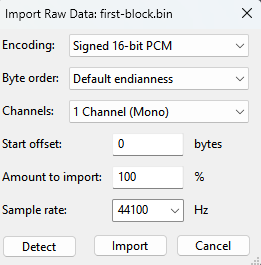
And it definitely looks like some audio.

It is kick probably from first bank. Okay if it’s audio what if i load whole file as Raw Data? And we can see here all audio samples in series.
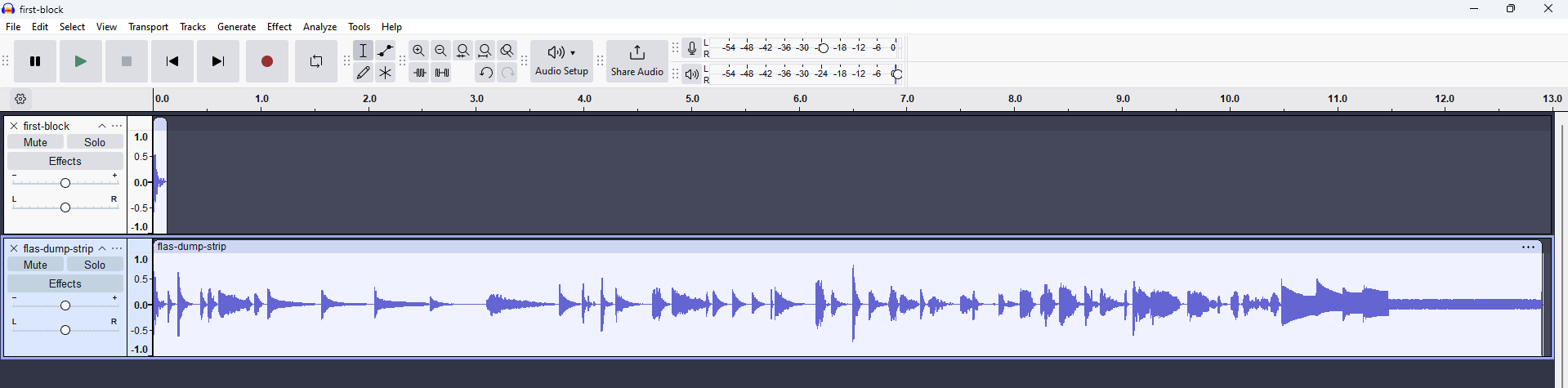
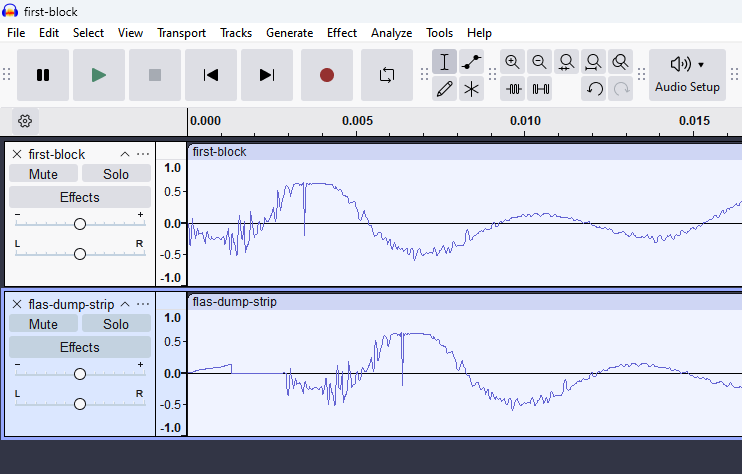
And of course in comparison with single accurately extracted sample we can see here our header which just grows a little bit before actual audio
Overwriting#
Okay here we have proofs that all drum and bass audio samples stored in this binary file. But as I found later only several first values of header actually matches starts of audio samples. So my next target is to create my own file, with my own sounds and header offsets.
I started by manually scrolling file and writing down all potential start points of audio samples.
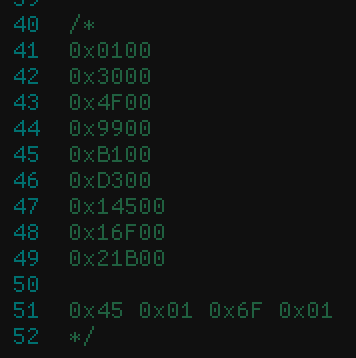
If we try to decode header in Big-Endian format as I proposed earlier all will look good until we meet combination 0x45 0x01 so in Big-Endian we should get 0x4501 but we don’t have here start of new sample, and even we jumping back which is incorrect.
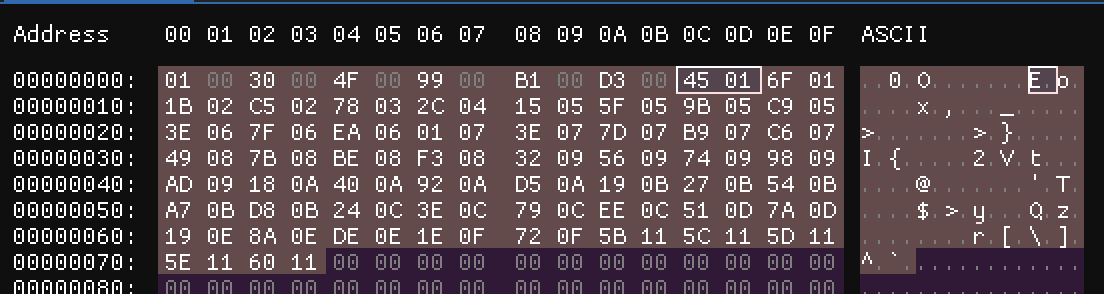
Okay but if we switch back to Little-Endian we also will get wrong value 0x45 0x01 will be 0x0145. Interesting… Do you see where it is going?

So after playing a bit with other values I come up to solution that here we have Little-Endian format where we store only upper 16bit of value aligned to 0x100 bytes.
Example:
We take bytes 0x45 0x01
Swap them to LE and will get: 0x0145
Last step we need to shift it left 8 bits: 0x14500
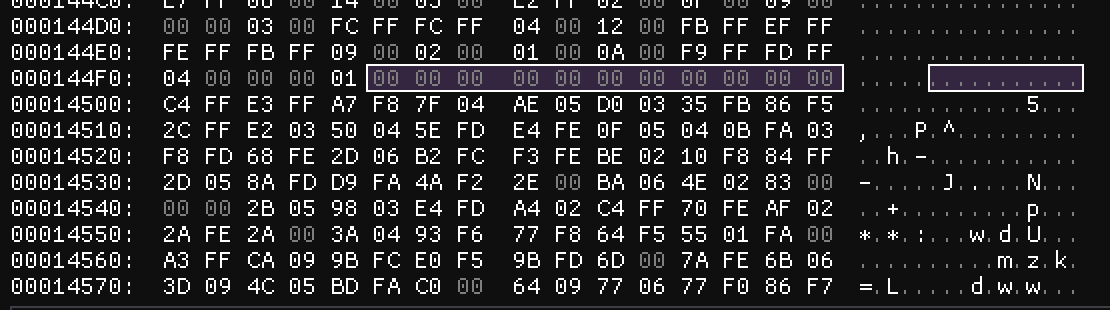
And we will get valid offset in blob as on screenshot after 0x00 bytes which indicates end of sample or silence at the end of audio clip
To prove my theory I wrote a python script which gets blob at input and fully parse it:
Python blob parser
import argparse
import struct
import wave

class Header:
    def __init__(self):
        self._header_byte_size = 0x100
        self._offsets = list()

    def decode(self, f):
        self._offsets = struct.unpack(
            "<128H".format(), bytes(f.read(self._header_byte_size))
        )  # read 0x100 bytes and interpret it as header
        self._offsets = [
            off << 8 for off in self._offsets
        ]  # bit shift all offsets 8 bits left
        for i in range(len(self._offsets)):
            if self._offsets[i] == 0:
                self._count = i
                break
        print(self._offsets)
        print("[*] Valid samples found: {}".format(self._count))

    def encode(self, f):
        pass

    def set_offsets(self, offsets):
        self._offsets = offsets

    def get_offsets(self):
        return self._offsets

    def get_count(self):
        return self._count


class AudioSample:
    def __init__(self, args):
        self._sample_rate = args.sample_rate
        self._begin_offset = 0
        self._sample_count = 0
        self._length_in_micro_seconds = 0

    def decode(self, f, start, end, sample_rate):
        self._sample_rate = sample_rate
        self._sample_count = int((end - start) / 2)
        self._length_in_micro_seconds = (self._sample_count / self._sample_rate) * 1000 * 1000
        print("[*] Creating audio sample: length: {:0>12.3f}us tell: 0x{:0>8X}, block: 0x{:0>8X} - 0x{:0>8X}, sample count: {:0>6d} (0x{:0>8X}h)".format(
            self._length_in_micro_seconds, f.tell(), start, end, self._sample_count, self._sample_count)
        )
        self._audio_data = f.read(end - start)

    def get_length_micro_seconds(self):
        return self._length_in_micro_seconds

    def export_wav(self, name):
        with wave.open(f"./{name}.wav", "wb") as wav:
            # The tuple should be (nchannels, sampwidth, framerate, nframes, comptype, compname)
            params = [1, 2, self._sample_rate, self._sample_count, 'NONE', 'not compressed']
            wav.setparams(params)
            wav.writeframesraw(self._audio_data)

    def export_bin(self, name):
        with open(f"./{name}.bin", "wb") as f:
            f.write(self._audio_data)

    def import_file(self):
        pass


class StylophoneBeat:
    def __init__(self, args):
        self._args = args
        self._header = Header()
        self._samples = list()
        self._total_length_micro_seconds = 0

    def decode(self, f):
        self._header.decode(f)
        offsets = self._header.get_offsets()
        for i in range(self._header.get_count() - 1):
            start = offsets[i]
            end = offsets[i + 1]
            self._samples.append(AudioSample(self._args))
            self._samples[i].decode(f, start, end, self._args.sample_rate)
            self._total_length_micro_seconds += self._samples[i].get_length_micro_seconds()
            self._samples[i].export_wav("{:d}".format(i))
        print("Total time length: {:.3f}".format(self._total_length_micro_seconds / (1000 * 1000)))

    def encode(self, f):
        pass


def main():
    parser = argparse.ArgumentParser(
        prog="stylophone-beat-converter",
        description="What the program does",
        epilog="Text at the bottom of help",
    )

    parser.add_argument("-s", "--sample-rate", type=int, default=44100, help="Sample rate used for processing audio")

    parser.add_argument("-d", "--decode", help="Path to input binary file file")
    parser.add_argument("-o", "--out-dir", help="Path to output directory after decoding binary blob file")

    parser.add_argument("-e", "--encode")
    parser.add_argument("-i", "--input-dir")

    args = parser.parse_args()
    print(args)

    stylophone = StylophoneBeat(args)

    if args.decode != "":
        with open(args.decode, "rb") as f:
            stylophone.decode(f)
        return 0

    if args.encode != "":
        with open(args.encode, "wb") as f:
            stylophone.encode(f)
        return 0


if __name__ == "__main__":
    main()


"""
Blob from SPI memory size was: 2 097 152 bytes
2097152 = 0x200000

0x100 - header size
0x200000 - 0x100 = 0x1FFF00
0x1FFF00 or 2096896 bytes in total can be filled with sample data
0x1FFF00 / 2 = 0xFFF80 or 1 048 448 items of 16bit samples can fit in total

1048448 / 33000 = 31 seconds
With sample rate 33000 we can fit up to 31 seconds of audio


"""
Output of script
python main.py -d ../flas-dump-strip.bin --sample-rate 33000
Namespace(decode='../flas-dump-strip.bin', encode=None, input_dir=None, out_dir=None, sample_rate=33000)
[256, 12288, 20224, 39168, 45312, 54016, 83200, 93952, 137984, 181504, 227328, 273408, 333056, 352000, 367360, 379136, 409088, 425728, 453120, 459008, 474624, 490752, 506112, 509440, 542976, 555776, 572928, 586496, 602624, 611840, 619520, 628736, 634112, 661504, 671744, 692736, 709888, 727296, 730880, 742400, 763648, 776192, 795648, 802304, 817408, 847360, 872704, 883200, 923904, 952832, 974336, 990720, 1012224, 1137408, 1137664, 1137920, 1138176, 1138688, 0, 0, 0, 0, 0, 0, 0, 0, 0, 0, 0, 0, 0, 0, 0, 0, 0, 0, 0, 0, 0, 0, 0, 0, 0, 0, 0, 0, 0, 0, 0, 0, 0, 0, 0, 0, 0, 0, 0, 0, 0, 0, 0, 0, 0, 0, 0, 0, 0, 0, 0, 0, 0, 0, 0, 0, 0, 0, 0, 0, 0, 0, 0, 0, 0, 0, 0, 13568, 1024, 66560]
[*] Valid samples found: 58
[*] Creating audio sample: length: 00182303.030us tell: 0x00000100, block: 0x00000100 - 0x00003000, sample count: 006016 (0x00001780h)
[*] Creating audio sample: length: 00120242.424us tell: 0x00003000, block: 0x00003000 - 0x00004F00, sample count: 003968 (0x00000F80h)
[*] Creating audio sample: length: 00287030.303us tell: 0x00004F00, block: 0x00004F00 - 0x00009900, sample count: 009472 (0x00002500h)
[*] Creating audio sample: length: 00093090.909us tell: 0x00009900, block: 0x00009900 - 0x0000B100, sample count: 003072 (0x00000C00h)
[*] Creating audio sample: length: 00131878.788us tell: 0x0000B100, block: 0x0000B100 - 0x0000D300, sample count: 004352 (0x00001100h)
[*] Creating audio sample: length: 00442181.818us tell: 0x0000D300, block: 0x0000D300 - 0x00014500, sample count: 014592 (0x00003900h)
[*] Creating audio sample: length: 00162909.091us tell: 0x00014500, block: 0x00014500 - 0x00016F00, sample count: 005376 (0x00001500h)
[*] Creating audio sample: length: 00667151.515us tell: 0x00016F00, block: 0x00016F00 - 0x00021B00, sample count: 022016 (0x00005600h)
[*] Creating audio sample: length: 00659393.939us tell: 0x00021B00, block: 0x00021B00 - 0x0002C500, sample count: 021760 (0x00005500h)
[*] Creating audio sample: length: 00694303.030us tell: 0x0002C500, block: 0x0002C500 - 0x00037800, sample count: 022912 (0x00005980h)
[*] Creating audio sample: length: 00698181.818us tell: 0x00037800, block: 0x00037800 - 0x00042C00, sample count: 023040 (0x00005A00h)
[*] Creating audio sample: length: 00903757.576us tell: 0x00042C00, block: 0x00042C00 - 0x00051500, sample count: 029824 (0x00007480h)
[*] Creating audio sample: length: 00287030.303us tell: 0x00051500, block: 0x00051500 - 0x00055F00, sample count: 009472 (0x00002500h)
[*] Creating audio sample: length: 00232727.273us tell: 0x00055F00, block: 0x00055F00 - 0x00059B00, sample count: 007680 (0x00001E00h)
[*] Creating audio sample: length: 00178424.242us tell: 0x00059B00, block: 0x00059B00 - 0x0005C900, sample count: 005888 (0x00001700h)
[*] Creating audio sample: length: 00453818.182us tell: 0x0005C900, block: 0x0005C900 - 0x00063E00, sample count: 014976 (0x00003A80h)
[*] Creating audio sample: length: 00252121.212us tell: 0x00063E00, block: 0x00063E00 - 0x00067F00, sample count: 008320 (0x00002080h)
[*] Creating audio sample: length: 00415030.303us tell: 0x00067F00, block: 0x00067F00 - 0x0006EA00, sample count: 013696 (0x00003580h)
[*] Creating audio sample: length: 00089212.121us tell: 0x0006EA00, block: 0x0006EA00 - 0x00070100, sample count: 002944 (0x00000B80h)
[*] Creating audio sample: length: 00236606.061us tell: 0x00070100, block: 0x00070100 - 0x00073E00, sample count: 007808 (0x00001E80h)
[*] Creating audio sample: length: 00244363.636us tell: 0x00073E00, block: 0x00073E00 - 0x00077D00, sample count: 008064 (0x00001F80h)
[*] Creating audio sample: length: 00232727.273us tell: 0x00077D00, block: 0x00077D00 - 0x0007B900, sample count: 007680 (0x00001E00h)
[*] Creating audio sample: length: 00050424.242us tell: 0x0007B900, block: 0x0007B900 - 0x0007C600, sample count: 001664 (0x00000680h)
[*] Creating audio sample: length: 00508121.212us tell: 0x0007C600, block: 0x0007C600 - 0x00084900, sample count: 016768 (0x00004180h)
[*] Creating audio sample: length: 00193939.394us tell: 0x00084900, block: 0x00084900 - 0x00087B00, sample count: 006400 (0x00001900h)
[*] Creating audio sample: length: 00259878.788us tell: 0x00087B00, block: 0x00087B00 - 0x0008BE00, sample count: 008576 (0x00002180h)
[*] Creating audio sample: length: 00205575.758us tell: 0x0008BE00, block: 0x0008BE00 - 0x0008F300, sample count: 006784 (0x00001A80h)
[*] Creating audio sample: length: 00244363.636us tell: 0x0008F300, block: 0x0008F300 - 0x00093200, sample count: 008064 (0x00001F80h)
[*] Creating audio sample: length: 00139636.364us tell: 0x00093200, block: 0x00093200 - 0x00095600, sample count: 004608 (0x00001200h)
[*] Creating audio sample: length: 00116363.636us tell: 0x00095600, block: 0x00095600 - 0x00097400, sample count: 003840 (0x00000F00h)
[*] Creating audio sample: length: 00139636.364us tell: 0x00097400, block: 0x00097400 - 0x00099800, sample count: 004608 (0x00001200h)
[*] Creating audio sample: length: 00081454.545us tell: 0x00099800, block: 0x00099800 - 0x0009AD00, sample count: 002688 (0x00000A80h)
[*] Creating audio sample: length: 00415030.303us tell: 0x0009AD00, block: 0x0009AD00 - 0x000A1800, sample count: 013696 (0x00003580h)
[*] Creating audio sample: length: 00155151.515us tell: 0x000A1800, block: 0x000A1800 - 0x000A4000, sample count: 005120 (0x00001400h)
[*] Creating audio sample: length: 00318060.606us tell: 0x000A4000, block: 0x000A4000 - 0x000A9200, sample count: 010496 (0x00002900h)
[*] Creating audio sample: length: 00259878.788us tell: 0x000A9200, block: 0x000A9200 - 0x000AD500, sample count: 008576 (0x00002180h)
[*] Creating audio sample: length: 00263757.576us tell: 0x000AD500, block: 0x000AD500 - 0x000B1900, sample count: 008704 (0x00002200h)
[*] Creating audio sample: length: 00054303.030us tell: 0x000B1900, block: 0x000B1900 - 0x000B2700, sample count: 001792 (0x00000700h)
[*] Creating audio sample: length: 00174545.455us tell: 0x000B2700, block: 0x000B2700 - 0x000B5400, sample count: 005760 (0x00001680h)
[*] Creating audio sample: length: 00321939.394us tell: 0x000B5400, block: 0x000B5400 - 0x000BA700, sample count: 010624 (0x00002980h)
[*] Creating audio sample: length: 00190060.606us tell: 0x000BA700, block: 0x000BA700 - 0x000BD800, sample count: 006272 (0x00001880h)
[*] Creating audio sample: length: 00294787.879us tell: 0x000BD800, block: 0x000BD800 - 0x000C2400, sample count: 009728 (0x00002600h)
[*] Creating audio sample: length: 00100848.485us tell: 0x000C2400, block: 0x000C2400 - 0x000C3E00, sample count: 003328 (0x00000D00h)
[*] Creating audio sample: length: 00228848.485us tell: 0x000C3E00, block: 0x000C3E00 - 0x000C7900, sample count: 007552 (0x00001D80h)
[*] Creating audio sample: length: 00453818.182us tell: 0x000C7900, block: 0x000C7900 - 0x000CEE00, sample count: 014976 (0x00003A80h)
[*] Creating audio sample: length: 00384000.000us tell: 0x000CEE00, block: 0x000CEE00 - 0x000D5100, sample count: 012672 (0x00003180h)
[*] Creating audio sample: length: 00159030.303us tell: 0x000D5100, block: 0x000D5100 - 0x000D7A00, sample count: 005248 (0x00001480h)
[*] Creating audio sample: length: 00616727.273us tell: 0x000D7A00, block: 0x000D7A00 - 0x000E1900, sample count: 020352 (0x00004F80h)
[*] Creating audio sample: length: 00438303.030us tell: 0x000E1900, block: 0x000E1900 - 0x000E8A00, sample count: 014464 (0x00003880h)
[*] Creating audio sample: length: 00325818.182us tell: 0x000E8A00, block: 0x000E8A00 - 0x000EDE00, sample count: 010752 (0x00002A00h)
[*] Creating audio sample: length: 00248242.424us tell: 0x000EDE00, block: 0x000EDE00 - 0x000F1E00, sample count: 008192 (0x00002000h)
[*] Creating audio sample: length: 00325818.182us tell: 0x000F1E00, block: 0x000F1E00 - 0x000F7200, sample count: 010752 (0x00002A00h)
[*] Creating audio sample: length: 01896727.273us tell: 0x000F7200, block: 0x000F7200 - 0x00115B00, sample count: 062592 (0x0000F480h)
[*] Creating audio sample: length: 00003878.788us tell: 0x00115B00, block: 0x00115B00 - 0x00115C00, sample count: 000128 (0x00000080h)
[*] Creating audio sample: length: 00003878.788us tell: 0x00115C00, block: 0x00115C00 - 0x00115D00, sample count: 000128 (0x00000080h)
[*] Creating audio sample: length: 00003878.788us tell: 0x00115D00, block: 0x00115D00 - 0x00115E00, sample count: 000128 (0x00000080h)
[*] Creating audio sample: length: 00007757.576us tell: 0x00115E00, block: 0x00115E00 - 0x00116000, sample count: 000256 (0x00000100h)
Total time length: 17.249
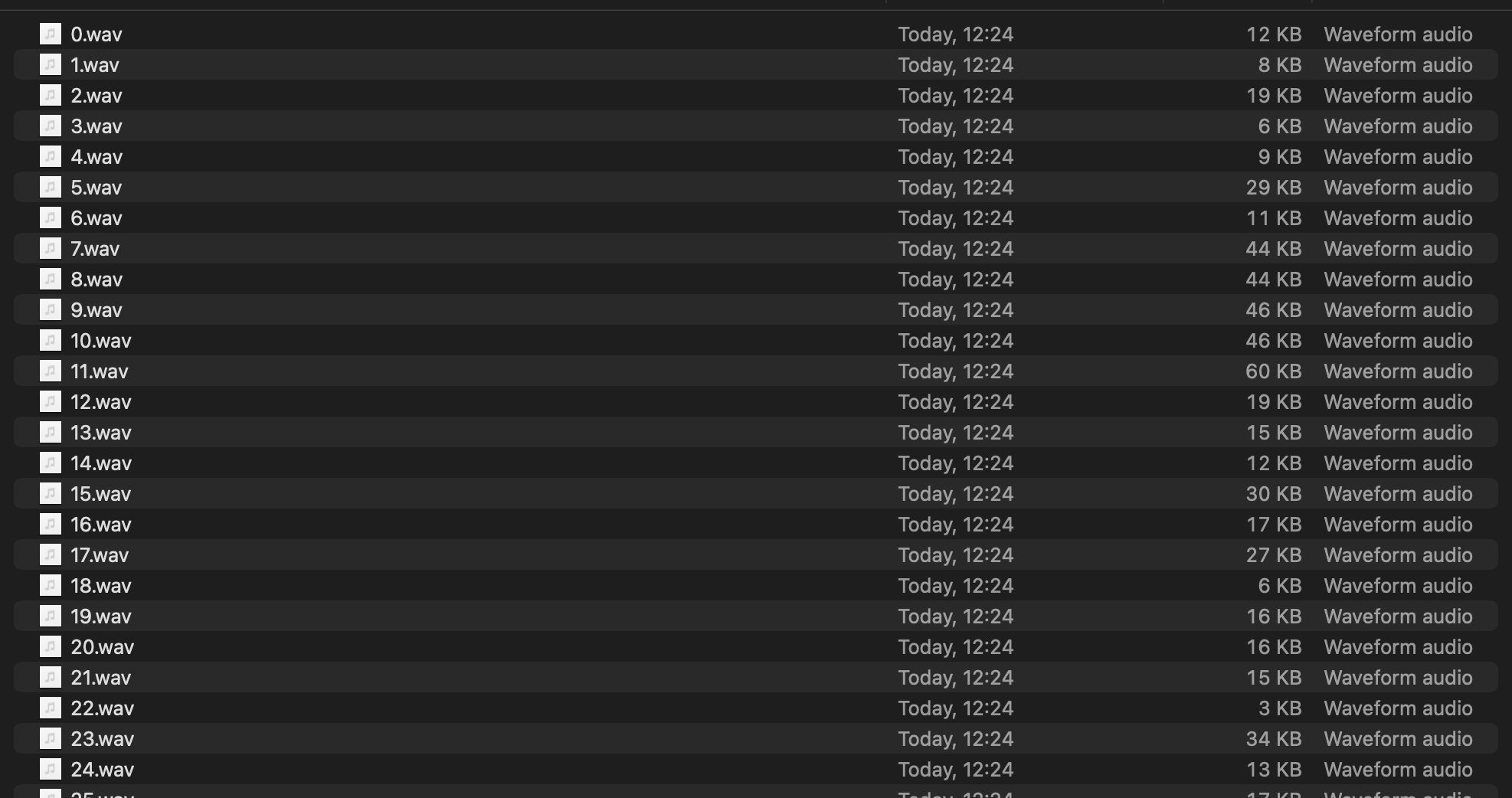
And as result I’ve got all the samples as audio files which I can listen and process/validate in more mature software for audio production
Next ideas#
The next steps will be to upload some custom samples and try to play them from real device. I have idea to create script which can take on input full audio and probably some JSON with described timings where to split audio or just take as input directory path which contains all samples and just encodes them in blob with corresponding paddings.
The tricky thing as you may remember that all sample offsets should be aligned to 0x100 and if my samples is longer or smaller I need to handle these cases and fill them with 0x00 bytes or silence. Currently I stick more with providing whole folder and automatically resolving all things and encoding header.
To be continued…